
Context
I have an old server running NixOS that is used as my media server: it hosts a Jellyfin instance. While no transcoding is necessary to play most of the movies, the server needs to transcode locally when the played movie uses a specific encoding format unknown by the streaming machine, or when burning subtitles. Transcoding mostly consists of decoding the media stream to raw data, processing it (by burning subtitles for instance) and encoding the media to a target format. This short post covers the setting up of the correct driver for my server (equipped of an Intel Quick Sync hardware accelerator) running NixOS.
My specifications
My server’s processor is an i3-3220, since no specific driver has been installed to leverage the hardware accelerator, the transcoding is done using the CPU which is slow and less efficient. However, the integrated GPU has a Quick Sync video component: a dedicated hardware component tailored for video encoding and decoding. The specifications provided by Intel tell you whether your processor includes a GPU with a Quick Sync component.
For my i3-3220, the platform specification confirmed Quick Sync availability (Gen7 architecture):
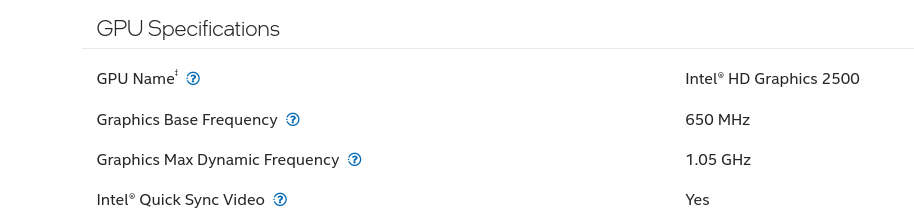
My GPU’s specifications
As said earlier, no driver has been installed on the machine to use the accelerator, and this is confirmed by the output of vainfo, a tool giving information on video acceleration hardware:
$ nix-shell -p libva-utils --run vainfo
 Trying display: wayland
 Trying display: x11
 error: can't connect to X server!
 Trying display: drm
 libva info: VA-API version 1.22.0
 libva info: Trying to open /run/opengl-driver/lib/dri/iHD_drv_video.so
 libva info: Trying to open /usr/lib/dri/iHD_drv_video.so
 libva info: Trying to open /usr/lib32/dri/iHD_drv_video.so
 libva info: Trying to open /usr/lib/x86_64-linux-gnu/dri/iHD_drv_video.so
 libva info: Trying to open /usr/lib/i386-linux-gnu/dri/iHD_drv_video.so
 libva info: va_openDriver() returns -1
 libva info: Trying to open /run/opengl-driver/lib/dri/i965_drv_video.so
 libva info: Trying to open /usr/lib/dri/i965_drv_video.so
 libva info: Trying to open /usr/lib32/dri/i965_drv_video.so
 libva info: Trying to open /usr/lib/x86_64-linux-gnu/dri/i965_drv_video.so
 libva info: Trying to open /usr/lib/i386-linux-gnu/dri/i965_drv_video.so
 libva info: va_openDriver() returns -1
 vaInitialize failed with error code -1 (unknown libva error),exit
Installing the appropriate driver
For Intel processors, there are two main driver options:
intel-vaapi-driver: For older platforms (up to Gen9)intel-media-driver: For newer platforms (Broadwell/Gen8 and newer)
Since my i3-3220 uses the Ivy Bridge architecture (Gen7), I need the intel-vaapi-driver. Here’s how I added it to my NixOS configuration:
 hardware.opengl = {
 enable = true;
 extraPackages = with pkgs; [
 intel-vaapi-driver
 ];
 };
After rebuilding the system, it is now properly detected by the vainfo tool. We can see that libva first tries to look for the newest driver iHD_drv_video and as expected fails to find any. Then it looks and finds the older i965_drv_video driver. This is confirmed by the then-listed decoding (VLD) and encoding (EncSlice) profiles.
$ nix-shell -p libva-utils --run vainfo
 Trying display: wayland
 Trying display: x11
 error: can't connect to X server!
 Trying display: drm
 libva info: VA-API version 1.22.0
 libva info: Trying to open /run/opengl-driver/lib/dri/iHD_drv_video.so
 libva info: Trying to open /usr/lib/dri/iHD_drv_video.so
 libva info: Trying to open /usr/lib32/dri/iHD_drv_video.so
 libva info: Trying to open /usr/lib/x86_64-linux-gnu/dri/iHD_drv_video.so
 libva info: Trying to open /usr/lib/i386-linux-gnu/dri/iHD_drv_video.so
 libva info: va_openDriver() returns -1
 libva info: Trying to open /run/opengl-driver/lib/dri/i965_drv_video.so
 libva info: Found init function __vaDriverInit_1_22
 libva info: va_openDriver() returns 0
 vainfo: VA-API version: 1.22 (libva 2.22.0)
 vainfo: Driver version: Intel i965 driver for Intel(R) Ivybridge Desktop - 2.4.0.pre1 (2.4.0.pre1)
 vainfo: Supported profile and entrypoints
 VAProfileMPEG2Simple            : VAEntrypointVLD
 VAProfileMPEG2Simple            : VAEntrypointEncSlice
 VAProfileMPEG2Main              : VAEntrypointVLD
 VAProfileMPEG2Main              : VAEntrypointEncSlice
 VAProfileH264ConstrainedBaseline: VAEntrypointVLD
 VAProfileH264ConstrainedBaseline: VAEntrypointEncSlice
 VAProfileH264Main               : VAEntrypointVLD
 VAProfileH264Main               : VAEntrypointEncSlice
 VAProfileH264High               : VAEntrypointVLD
 VAProfileH264High               : VAEntrypointEncSlice
 VAProfileH264StereoHigh         : VAEntrypointVLD
 VAProfileVC1Simple              : VAEntrypointVLD
 VAProfileVC1Main                : VAEntrypointVLD
 VAProfileVC1Advanced            : VAEntrypointVLD
 VAProfileNone                   : VAEntrypointVideoProc
 VAProfileJPEGBaseline           : VAEntrypointVLD
We can further check that the accelerator component is working as expected by starting a streaming session on Jellyfin that requires transcoding. Using the intel_gpu_top command from the intel-gpu-tools package, we can monitor the GPU usage, which confirms its usage for the transcoding task:
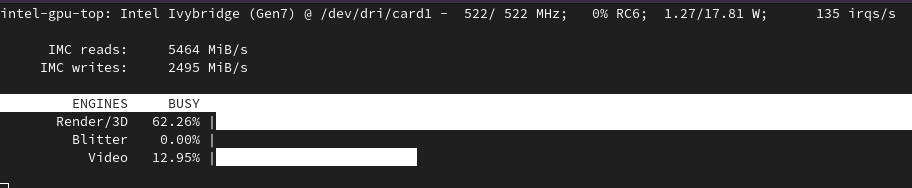
My GPU’s specifications
Benchmark
Also, we can now compare the performances of a CPU-only transcoding task to a hardware-accelerated one using ffmpeg and the same input file.
$ ffmpeg -i input.mkv -c:v libx264 -t 120 -stats -preset medium -c:a copy output_cpu.mp4
[...]
[out#0/mp4 @ 0x75e6980] video:16763KiB audio:15000KiB subtitle:0KiB other streams:0KiB global headers:0KiB muxing overhead: 0.239242%
frame= 2878 fps= 21 q=-1.0 Lsize=   31839KiB time=00:01:59.95 bitrate=2174.4kbits/s speed=0.876x
On average, ffmpeg was able to transcode 21 frames per second when solely relying on CPU. Using hardware acceleration is approximately 6 times faster :
$ ffmpeg -i input.mkv -preset medium -vaapi_device /dev/dri/renderD128 -vf 'format=nv12,hwupload' -c:v h264_vaapi -c:a copy -t 120 -stats output_hw.mp4
[...]
[out#0/mp4 @ 0xf5469c0] video:50873KiB audio:15000KiB subtitle:0KiB other streams:0KiB global headers:0KiB muxing overhead: 0.108443%
frame= 2878 fps=122 q=-0.0 Lsize=   65944KiB time=00:01:59.99 bitrate=4502.0kbits/s speed=5.09x
While my hardware accelerator only supports a limited list of formats for encoding/decoding, setting up the proper drivers allows Jellyfin (ffmpeg under the hood) to get higher transcoding performances for the supported ones. For setting this up, here are a few of the interesting links I came accross:
Banner image: Gustave Moreau (1876). Salomé dansant devant Hérode. Hammer Museum, Los Angeles.